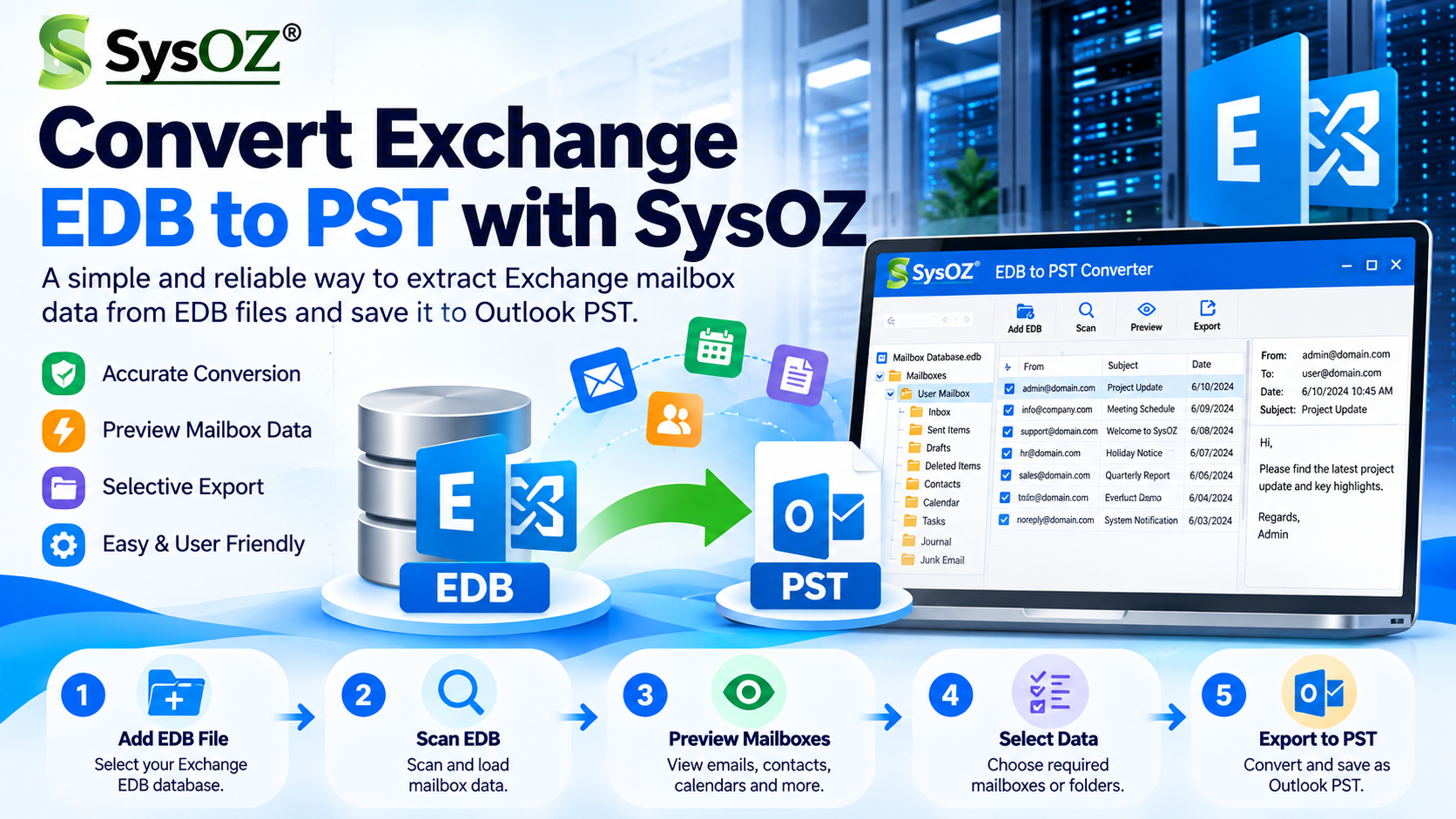
How to Convert Exchange EDB to PST – Complete Step-by-Step Guide
Microsoft Exchange Server stores mailbox information in an EDB (Extensible Storage Engine Database) file. When administrators need to migrate Exchange data, archive mailboxes, recover information, or access mailbox data through Outlook, converting EDB to PST can be a useful solution.
An EDB file cannot normally be opened directly in Microsoft Outlook, whereas a PST file can be opened and managed using Outlook. Therefore, converting Exchange EDB data to PST can make mailbox information easier to access, transfer, and archive
In this guide, we will explain different ways to convert Exchange EDB to PST, including the Exchange Server export method and dedicated EDB to PST converter software.
For users who need a straightforward way to convert Exchange mailbox data, an EDB to PST converter can help export mailbox items from an EDB file into Outlook PST format. The appropriate method depends on whether Exchange Server is available and the condition of the EDB file.
Why Convert Exchange EDB to PST?
There are several situations where an administrator may need to convert Exchange EDB data into PST format:
Exchange Server migration
Mailbox data archiving
Exchange Server decommissioning
Creating an offline copy of mailbox data
Recovering mailbox information
Accessing Exchange data through Outlook
Exporting selected mailbox folders
Managing mailbox data outside the Exchange environment
PST files can contain emails, attachments, contacts, calendars, tasks, notes, and other Outlook mailbox information.
Method 1: Export Exchange Mailbox to PST
If the Exchange Server is running properly and the required mailbox is accessible, administrators can use Exchange's built-in mailbox export functionality.
Step 1: Assign Mailbox Export Permission
Before creating a mailbox export request, make sure the administrator has the required Mailbox Import Export role.
Step 2: Prepare a Network Location
Create a suitable shared network folder where Exchange can save the PST file.
For example:
\\ServerName\PSTFiles\UserMailbox.pst
Make sure the Exchange Trusted Subsystem has the necessary permissions on the destination folder.
Step 3: Create the Export Request
Open Exchange Management Shell and run an appropriate mailbox export command, such as:
New-MailboxExportRequest -Mailbox "UserMailbox" -FilePath
"\\SERVER01\PSTFiles\UserMailbox.pst"
This starts the export process for the selected mailbox.
Step 4: Check Export Status
You can check the export request using:
Get-MailboxExportRequest
For additional details, administrators can use mailbox export request statistics.
Limitations of the Native Exchange Export Method
The built-in Exchange export method can be useful when the Exchange environment is operational. However, it may not be suitable when you only have an offline EDB file or when the original Exchange mailbox environment is unavailable.
In these situations, dedicated EDB to PST conversion software can provide an alternative way to extract mailbox data from an offline EDB database.
Method 2: Convert Offline EDB to PST Using EDB to PST Converter
An EDB to PST converter is designed to scan an Exchange database file and extract mailbox data into Outlook-compatible PST files.
A typical conversion process includes:
1. Select the EDB file.
2. Scan the Exchange database.
3. Preview mailbox folders and data.
4. Select the required mailbox or folders.
5. Choose PST as the export format.
6. Select a destination folder.
7. Start the conversion.
8. Open the resulting PST file in Outlook.
This method can be useful when working with an offline EDB database and when direct access to the original Exchange mailbox is not available.
How to Convert Exchange EDB to PST Using SysOZ
SysOZ EDB to PST Converter provides a simple workflow for extracting mailbox data from an Exchange EDB file and saving it in PST format.
Step 1: Launch SysOZ EDB to PST Converter

Install and launch the SysOZ EDB to PST Converter on your Windows computer.
Step 2: Select the EDB File
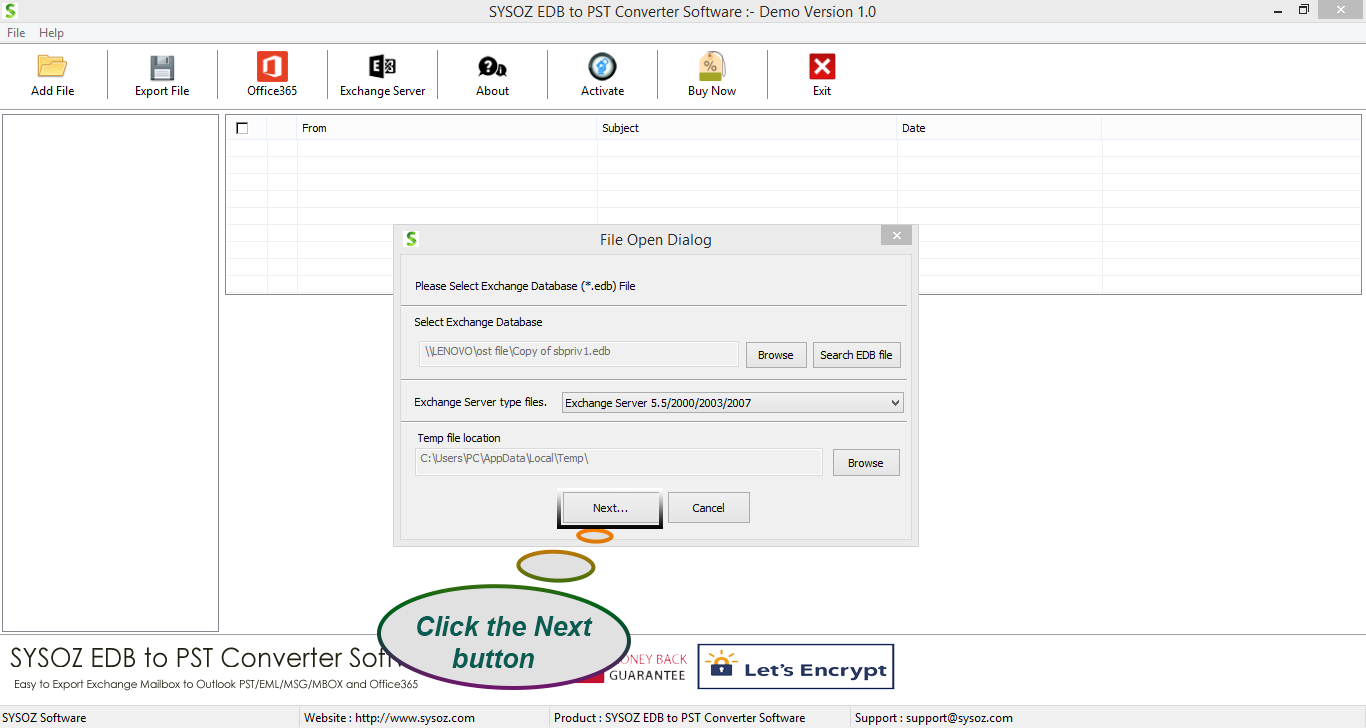
Browse to the location of your Exchange EDB database and select the required file.
The software scans the selected EDB file and displays the available mailbox information.
Step 3: Preview Mailbox Data
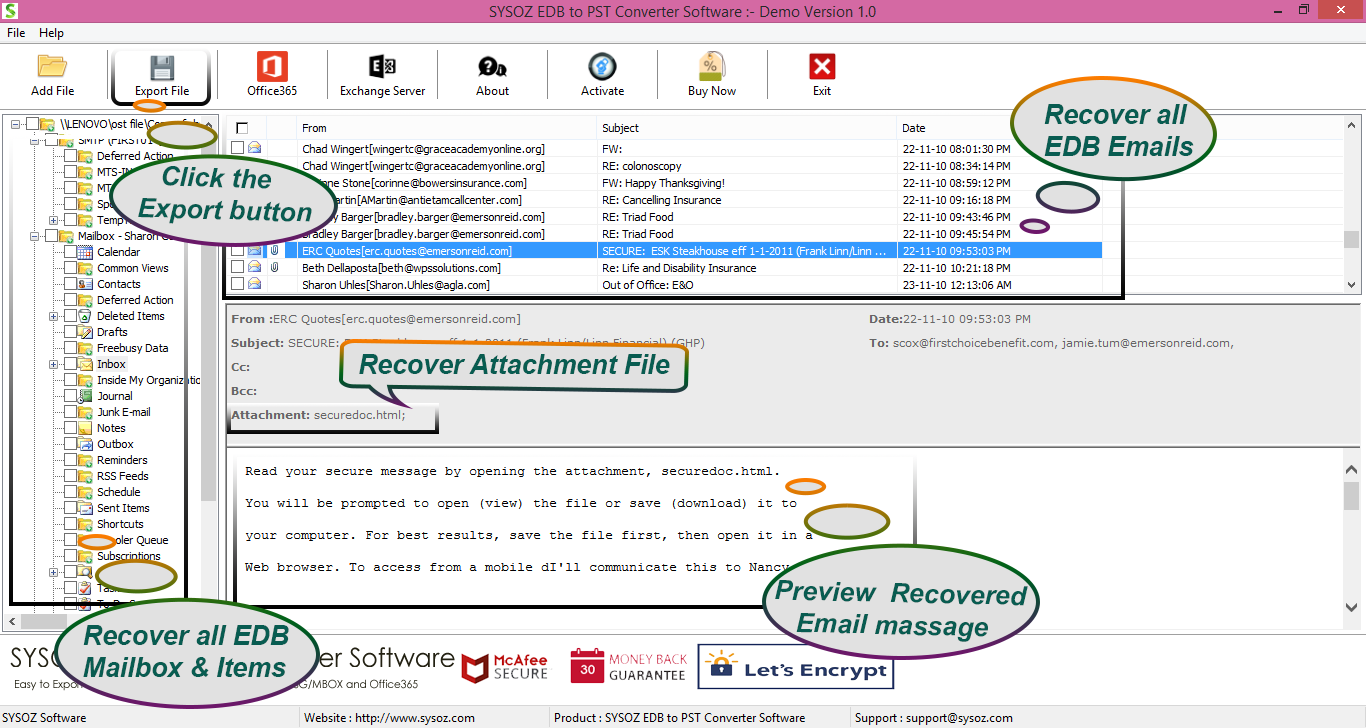
After scanning, you can browse the available mailbox folders and preview the data.
Preview available emails, attachments, contacts, calendars, tasks, notes, and folders before exporting.
Step 4: Select Mailboxes or Folders
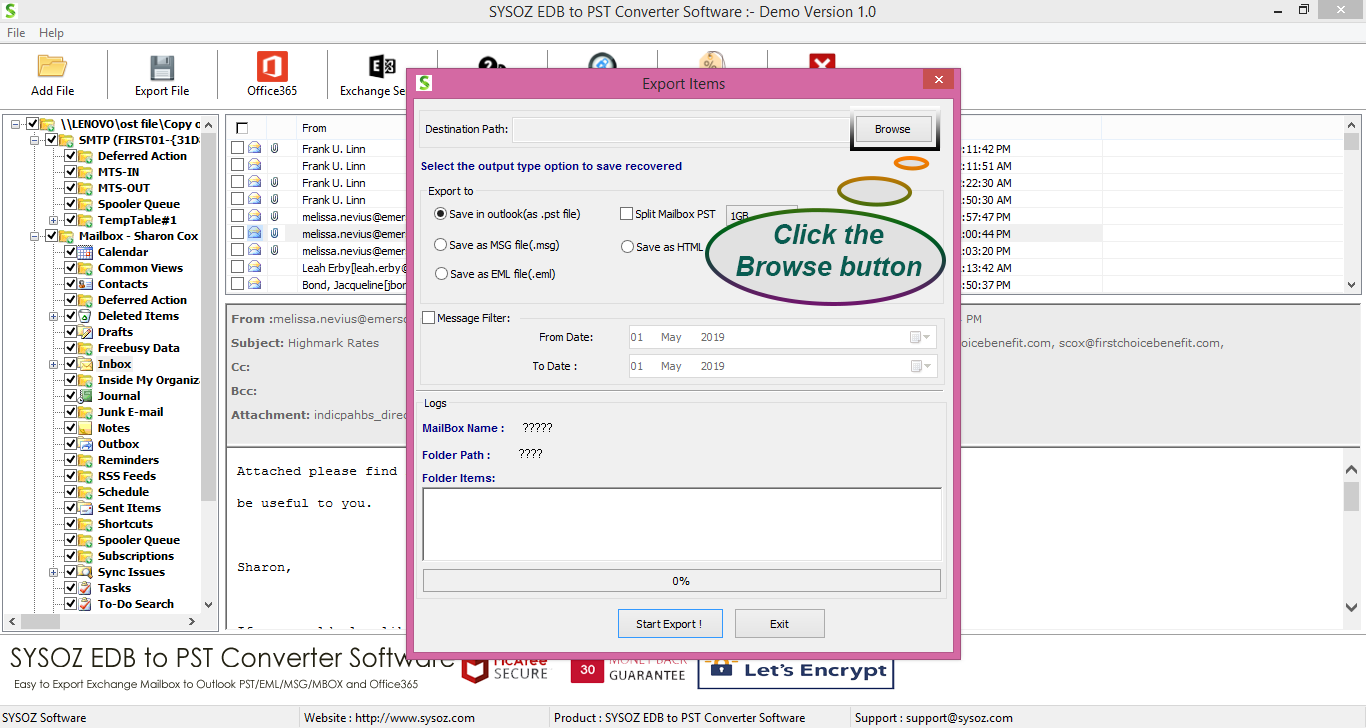
Select the mailbox, folders, or specific data you want to export.
This can help when you need to convert only selected mailbox data instead of processing everything.
Step 5: Select PST as the Export Format
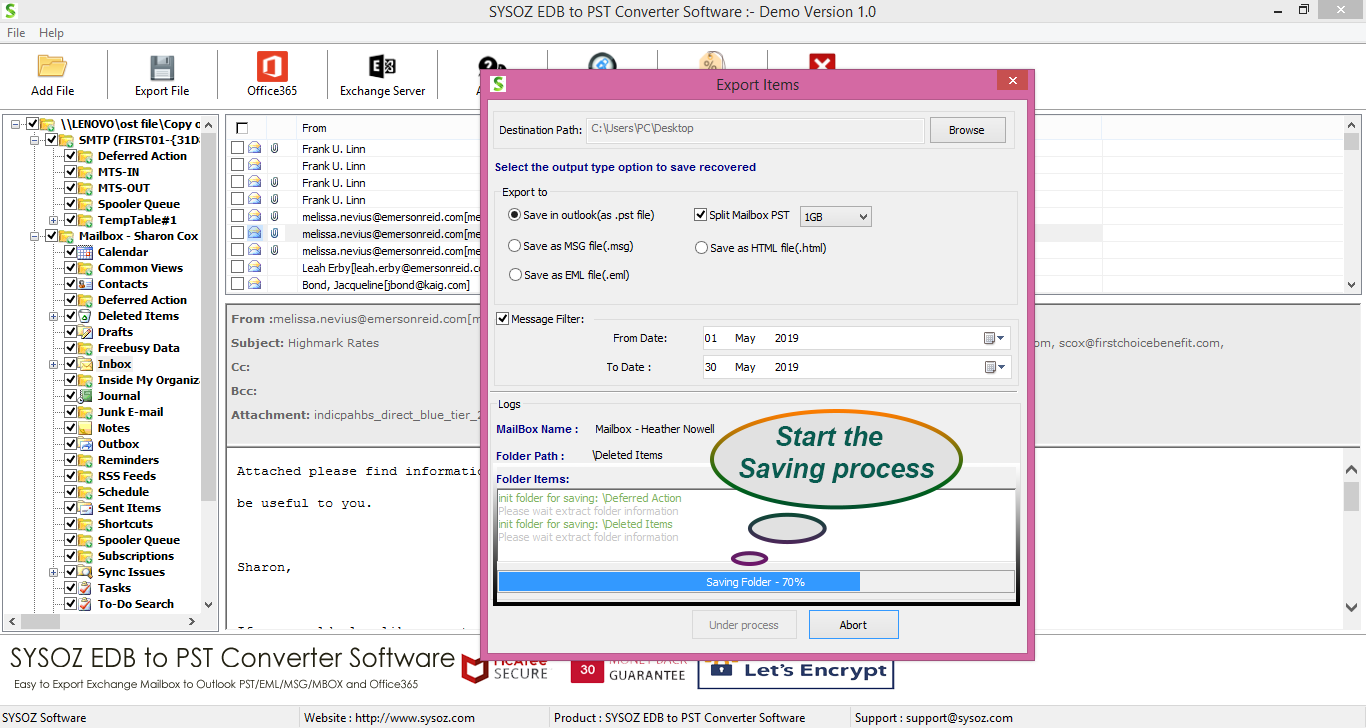
Choose PST as the output format and select the destination location for the converted file.
Step 6: Start the Conversion
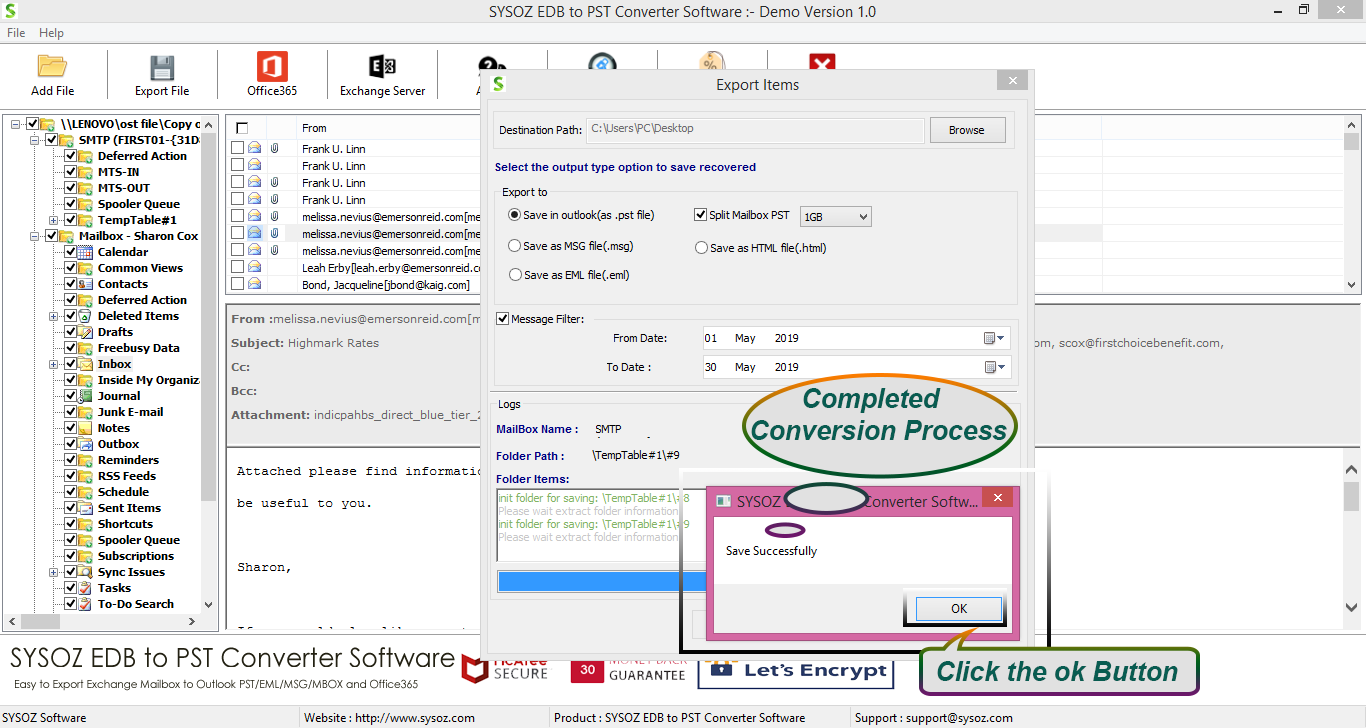
Start the conversion process. The software processes the selected EDB data and creates PST output files.
Step 7: Open the PST in Outlook
After the conversion is completed, open Microsoft Outlook and select:
File → Open & Export → Open Outlook Data File
Select the converted PST file to access the exported mailbox data.
Things to Check Before Converting EDB to PST
Before starting the conversion, consider these points:
Keep a Backup of the Original EDB
Always preserve the original EDB database and, where possible, work with a copy.
Check Available Storage
Large Exchange databases can contain substantial amounts of mailbox data and attachments. Make sure the destination drive has sufficient free space.
Select Required Mailboxes
If the EDB contains multiple mailboxes, identify the required mailbox data before starting the conversion.
Verify the Converted PST
After conversion, open the PST in Outlook and check important emails, attachments, contacts, calendars, and folders.
Use a Separate Destination
Save converted PST files in a separate folder to make them easier to organize and verify.
How to Export EDB Mailbox Data to PST
Exporting mailbox data from an Exchange EDB file to PST allows users to access emails and other mailbox items in Microsoft Outlook. When Exchange Server is available, administrators can use its native mailbox export options. For offline EDB files, an EDB to PST conversion tool may help extract selected mailbox data and save it in PST format.
Benefits of Converting EDB to PST
Converting Exchange EDB data to PST can help administrators:
Access mailbox data through Outlook
Archive mailbox information
Move mailbox data between environments
Extract selected mailbox folders
Maintain an offline copy of mailbox data
Simplify certain Exchange migration workflows
Frequently Asked Questions
Yes. Dedicated EDB to PST converter software can scan an offline EDB database and export available mailbox data to PST.
Yes. Exchange mailbox data can be exported to PST using supported Exchange export functionality, while dedicated EDB-to-PST software can be used for offline EDB scenarios.
Yes. Depending on the software and EDB database, you can select specific mailboxes or folders for export.
EDB is the database format used by Exchange Server to store mailbox information. PST is an Outlook data file used to store and access mailbox data.
Yes. PST can be used as an intermediate or archival format in certain Exchange migration and data-transfer workflows.
Yes. Outlook provides an option to open an existing PST data file and access its mailbox folders and contents.
Yes, Exchange mailbox data can be exported to PST using suitable methods, depending on whether Exchange Server is available and whether the EDB file is accessible. For offline EDB files, a compatible EDB to PST converter may help extract mailbox data and save it in PST format.
The process depends on the EDB file condition and available Exchange environment. Before conversion, back up the original EDB file and verify that the selected tool supports your Exchange database version.
Convert Exchange EDB to PST with SysOZ
Need an easy way to extract mailbox data from an Exchange EDB file?
SysOZ EDB to PST Converter provides a simple workflow to scan EDB files, preview mailbox data, select required folders, and export mailbox information to PST format.
Free Download Purchase
Conclusion
Converting Exchange EDB to PST can be useful for mailbox archiving, migration, recovery, and accessing Exchange mailbox data through Outlook.
If the Exchange Server is operational, administrators can use the native mailbox export functionality. For offline EDB databases, dedicated EDB to PST converter software provides another approach for extracting mailbox information and creating Outlook-compatible PST files.
With SysOZ EDB to PST Converter, users can scan an EDB file, preview available mailbox data, select the required content, and export it to PST through a straightforward conversion workflow.
Comments